UIF Status Check: How to Check Your UIF Claim Status Online
You submitted your UIF claim, and now you are waiting. A UIF status check is how you find out where that claim stands — whether it has been received, whether anything is missing, whether it has been approved, and whether a payment has been made. This guide explains how to check your status through the official channels, what the result usually means, and what to do when the status does not move.
The quick answer: check on UIF Online
For employee benefit claims, check your status on UIF Online at uifonline.labour.gov.za. Log in with your UIF Online account and open your claim from your dashboard. That is where your current claim is tracked since the old uFiling employee claims portal closed on 20 May 2026.
If you have no internet access, dial the UIF USSD code *134*843# from any cellphone and follow the menu, entering your ID number when asked. The USSD channel is reported as a Department of Employment and Labour service for claim and payment status checks. If you would rather speak to someone, call the UIF call centre on 0800 030 007 with your ID number and claim reference ready.
Do not use a third-party website that offers to check your status for you. There is no public page where you can type in an ID number and see a claim, and any site that asks you to pay for a status check, or to hand over your password, is not acting for the UIF.
UIF Payment Status Checker
GuideA claim status and a payment status are not the same thing — a claim can be approved while its payment is still being processed. If a payment shows as made but nothing arrived, check the bank details on your claim first, then your bank, then the call centre.
What a UIF status check tells you
A status check shows you the position of your own claim at the time you look. In general terms, it can tell you:
- Whether your application has been received.
- Whether your claim is still being assessed.
- Whether the UIF needs documents or information from you.
- Whether your claim has been approved.
- Whether a payment has been processed or paid.
- Whether your claim has been rejected, and — in many cases — why.
It does not tell you a payment date in advance, and it does not guarantee that a payment will be made. Approval and payment are separate steps, and a claim can be approved while its payment is still being processed. If you want to know specifically about money, read the payment-status guidance as well — a claim status and a payment status are not the same thing, even though they are shown in the same place.
How to check your UIF status online, step by step
- Go to UIF Online yourself. Type
uifonline.labour.gov.zainto your browser's address bar. Do not follow a link from a search advert or a message. Check that the address is on thelabour.gov.zadomain. - Log in. Enter your username or ID number and your password for UIF Online. If you have never used UIF Online, you need to register first. If you forgot your password, use the reset option on the login page.
- Open your claim. On your dashboard, find your claim or application and open it. Your current status, claim reference number and claim history should be shown there.
- Read the whole entry, not just the headline status. Look for any note about outstanding documents, banking details, or something the UIF is waiting for. A short status label on its own often hides the actual reason a claim is not moving.
- Note what you see. Write down the status wording exactly as shown, the date you checked, and your reference number. If you need to phone the call centre later, that note will save you from starting from the beginning.
If you applied on the old uFiling portal before it closed on 20 May 2026, check UIF Online first. The Department has said applications from the old portal were stored and moved into the new system and none were lost. If your claim does not appear, do not submit a second claim immediately — contact the call centre or the Labour Centre handling your claim, with your ID number and your old reference number, and ask them to confirm where the claim is.
What you need for a status check
- Your 13-digit South African ID number.
- Your UIF Online login details (username or ID number, and password).
- Your claim or case reference number, if you have one. It is very useful on the phone and at a Labour Centre, but you can usually open your claim online without it once you are logged in.
- The cellphone number and email address you registered with, in case the portal asks you to confirm a code.
Keep your ID number private. Only enter it on the official UIF Online portal, on the official USSD menu, or when speaking to the call centre or a Labour Centre official. Never send your ID number to a stranger on social media or WhatsApp who offers to check your status for you.
What your UIF status means
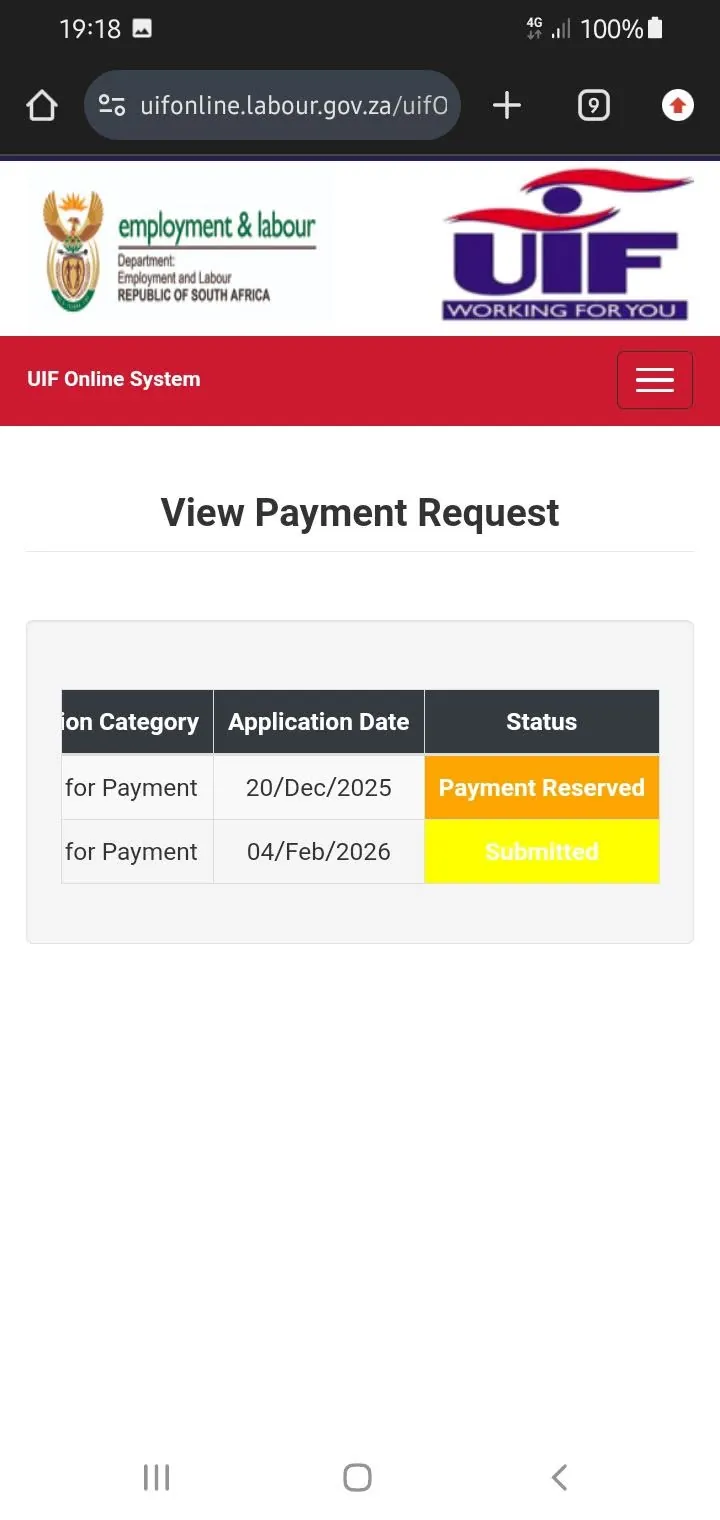
The portal shows your claim's position in plain words, but the exact wording can change, and the Department does not publish a single fixed list of status labels that this guide can quote with confidence. So instead of a word-for-word table, here is what the broad positions mean in practice. Match the wording you see to the closest description below, and always read any note attached to your claim — the note matters more than the label.
Your claim has been received
Your application is in the system. Nothing has been decided yet. This is normal in the first stage, and it does not mean there is a problem.
Your claim is being assessed
The UIF is working through your application and checking your details, contributions and documents. You do not need to do anything unless the claim asks you for something. Checking every day will not make the assessment faster.
The UIF needs documents or information
Something is missing or unclear — often a document, a form from your employer, or banking details. This is the status to act on. Find out exactly which document is outstanding, submit it through the correct channel, and keep proof that you submitted it. A claim can sit in this position for a long time if the missing item is never supplied.
Your claim has been approved
Your claim has been accepted. Approval is not the same as payment. A payment still has to be processed, and it will go to the bank account the UIF has on record for you. Check that your banking details on the portal are correct.
A payment is being processed or has been paid
Money is on its way, or has already been sent to your bank. If a payment shows as made but nothing has arrived in your account, check the bank account details on your claim first, then check with your bank, and then contact the call centre. Do not assume a fixed number of days for the money to appear — ask the call centre about the position of your specific payment.
Your claim has been rejected
Your claim was not successful. Do not simply reapply. Find out the reason given, because the reason decides what you can do next — it may be a missing document you can supply, an eligibility question, or a decision you can challenge through the proper process. If you believe the decision is wrong, ask the Labour Centre or the call centre what the review or appeal route is for your type of claim, and note any deadline they give you. This guide does not state appeal deadlines, because they can differ by claim type and the correct figure must come from the official guidance for your case.
Other ways to check your UIF status
By USSD, without internet
Dial *134*843# from any cellphone. The service is reported as free and as working without mobile data or a smartphone. Follow the menu, choose the claim or payment status option, and enter your ID number when asked. USSD gives you a basic status — it cannot show you full documents or let you upload anything. If the USSD menu cannot find your claim, check on UIF Online or call the call centre instead of assuming the claim does not exist. The USSD service dates from before UIF Online, and claims that moved systems can be the ones it struggles with.
By phone
Call the UIF call centre on 0800 030 007. Have your ID number, your claim reference number and a note of the status you saw online ready before you call. The number is widely reported as toll-free, and its hours are reported as weekdays 07:30 to 16:00 — confirm the hours when you call. Expect to wait at busy times, and expect the call centre to ask you questions that confirm your identity before discussing your claim.
In person
Visit the Labour Centre handling your claim with your ID. This is the best option when your claim needs documents handed in, when your status is unclear after phoning, or when you need help using the online portal. Take your reference number and copies of anything you have already submitted.
What to do if your status is stuck
A status that does not change for weeks is frustrating, and it is the most common complaint about UIF claims. Work through these checks in order before you assume the worst.
- Check for an outstanding item. Open the claim and read every note. A missing document is the most common reason a claim stops moving, and the portal does not always make it obvious.
- Check your contact and banking details. If the UIF cannot reach you, or has the wrong bank account, the claim can stall. Make sure the details on your claim are current.
- Check whether your claim asks you to confirm anything regularly. Some benefit claims ask you to confirm, at intervals, that you are still eligible — for example, that you are still unemployed. If your claim has such a request and it has not been answered, payments can pause. Check your claim for any such request and do not ignore it.
- Check that you are looking at the right system. If you are still checking uFiling for an employee claim, you are looking in the wrong place. Employee claims are tracked on UIF Online.
- Contact the call centre or Labour Centre. If nothing is outstanding and the status still does not move, phone with your reference number and the exact status wording and ask what is holding the claim. Ask what the next step is and who is responsible for it, and note the answer.
Do not pay anyone who promises to "push" your claim, and do not submit a second claim to try to speed things up. A duplicate claim can create confusion about which application is the real one.
Staying safe while you check your status
Checking your status is free on every official channel. Never pay a person or a website to check it for you. Never share your UIF Online password, a one-time code, or your full banking details with someone who contacts you about your claim. The UIF will not ask you for your password. Be wary of messages claiming your payment is ready if you click a link or pay a fee — go to UIF Online by typing the address yourself instead.
Conclusion
A UIF status check is a simple habit once you know where to look: log in to UIF Online, open your claim, and read the status and its notes. USSD on *134*843# and the call centre on 0800 030 007 are the fallbacks when you have no internet or need a person to explain what is holding your claim. The status label alone rarely tells the whole story — the note attached to your claim, and whether anything is outstanding, is what decides your next step. Check through the official channels, keep your reference number and your ID safe, and never pay anyone to check a status that is free to check yourself.
Frequently asked questions
Tap a question to see the answer.
Log in to UIF Online at uifonline.labour.gov.za, open your claim from your dashboard, and read the status and any notes attached to it. That is the official route for employee benefit claims in 2026.
Your ID number is the key piece of information, but there is no public page where typing an ID number alone shows a claim. Online, you log in with your account and your ID is part of that login. By USSD you dial *134*843# and enter your ID number when asked. By phone, you give your ID number to the call centre. Never enter your ID number on a third-party "status check" website.
It usually means the claim is still being assessed, or that something is outstanding — often a document. Open the claim, read every note, check your banking and contact details, and make sure no regular confirmation is overdue. If nothing is outstanding, contact the call centre or Labour Centre with your reference number.
Approval and payment are separate steps. Check your claim for payment information, confirm the bank account on record is correct, and check with your bank. If the payment still does not appear, contact the UIF call centre and ask about the position of that specific payment. Do not assume a fixed number of days — ask about your claim.
Not for employee benefit claims. The employee claims side of uFiling closed on 20 May 2026. Employee claims are now made and tracked on UIF Online. uFiling remains for employers' registrations, declarations and contributions.
This guide does not recommend one. Sources disagree on whether the Department operates a UIF WhatsApp channel, and the Department's contact pages are reported to list the call centre and USSD rather than a WhatsApp number. Use UIF Online, USSD, the call centre, or a Labour Centre, and do not trust a WhatsApp number passed around on social media.