

UIF Registration in South Africa
"UIF registration" means different things to different people, and that is where most confusion starts. An employee, an employer and a household employing a domestic worker do not register in the same way, on the same form, or for the same reason. If you follow the wrong route, you can spend weeks on a process that was never meant for you.
This guide separates the three registrations clearly: employees and work seekers, employers, and domestic employers. Find your situation, follow only that section, and use the final checklist to confirm you have done what your situation actually requires.
First: who has to register at all
The basic rule is simple. In South Africa, employers and employees must contribute to the UIF, and the contribution is 2% of the employee's remuneration — 1% deducted from the employee and 1% added by the employer. That is confirmed on the official SARS UIF page.
The main threshold is working time. Since 1 April 2002, workers who work for 24 hours or more per month must contribute to the Fund — that is confirmed in the Government's Vuk'uzenzele UIF guide. SARS likewise lists employees working less than 24 hours a month as excluded from contributing. So a person working a few hours a month for one employer is generally outside the system for that job, while a person working 24 hours or more a month for an employer is inside it.
Registration is the step that puts a person or an employer on the Fund's records so that contributions can be paid and, later, benefits can be claimed. Without registration and the contribution record that follows it, there is nothing for a claim to be based on.
UIF Registration Guide Tool
GuideWorkers who work 24 hours or more a month must contribute — confirmed in the Government's Vuk'uzenzele UIF guide. Employees working less than 24 hours a month are excluded. Domestic workers have been covered since 1 April 2003.
Registration 1: Employees and work seekers
What employee registration means
Employees do not usually "register for UIF" in the same way an employer does. For most workers, registration happens through the employer: the employer registers as an employer, registers the employee, and deducts and pays the contributions. The employee's part is to make sure they are registered and that their details are correct — and, when they need to claim, to register as a work seeker and submit the claim.
That distinction matters. If you are employed and your employer has registered you, you do not need a separate employee registration. If you are employed and your employer has not registered you, the problem is the employer's registration, not yours — and it is the employer's duty to fix it.
Registering as a work seeker
When your employment ends and you need to claim, you register as a work seeker. This is the step that records you as a person looking for work, and it is part of the claim process rather than a standalone registration you do while still employed.
Employee benefit claims are now made through UIF Online, the Department of Employment and Labour's portal for employee benefit claims at uifonline.labour.gov.za. You create an account on UIF Online, register as a work seeker where the process asks you to, and submit your claim with the supporting documents. Keep your identity number, your employment history and your banking details ready before you start, and keep the reference number you are given.
What employees need
- Your 13-digit South African identity number.
- Your employment details: employer name, start and end dates, and the reason your employment ended.
- Your banking details, for an account in your own name.
- The documents for your benefit type, including the employer's UI-19 declaration and the relevant application and banking forms.
If your employer never registered you
This is a common and serious problem. If you were working 24 hours or more a month and your employer never registered you or never paid contributions, your contribution record will be missing or incomplete — and that can delay or block a claim. Do not wait and hope the record appears. Raise it with the UIF, with your payslips and any proof of employment you have, so the missing record can be investigated. Your payslips showing UIF deductions are particularly useful evidence: if money was deducted but never paid over, that is a matter for the Fund to pursue with the employer.
Registration 2: Employers
Who counts as an employer for UIF
Any employer who pays or is liable to pay remuneration to an employee must contribute to the Fund on a monthly basis — that is the position stated on the SARS UIF page. In practice, if you employ someone for 24 hours or more a month, you are an employer for UIF purposes and you must register, declare and pay.
How employers register
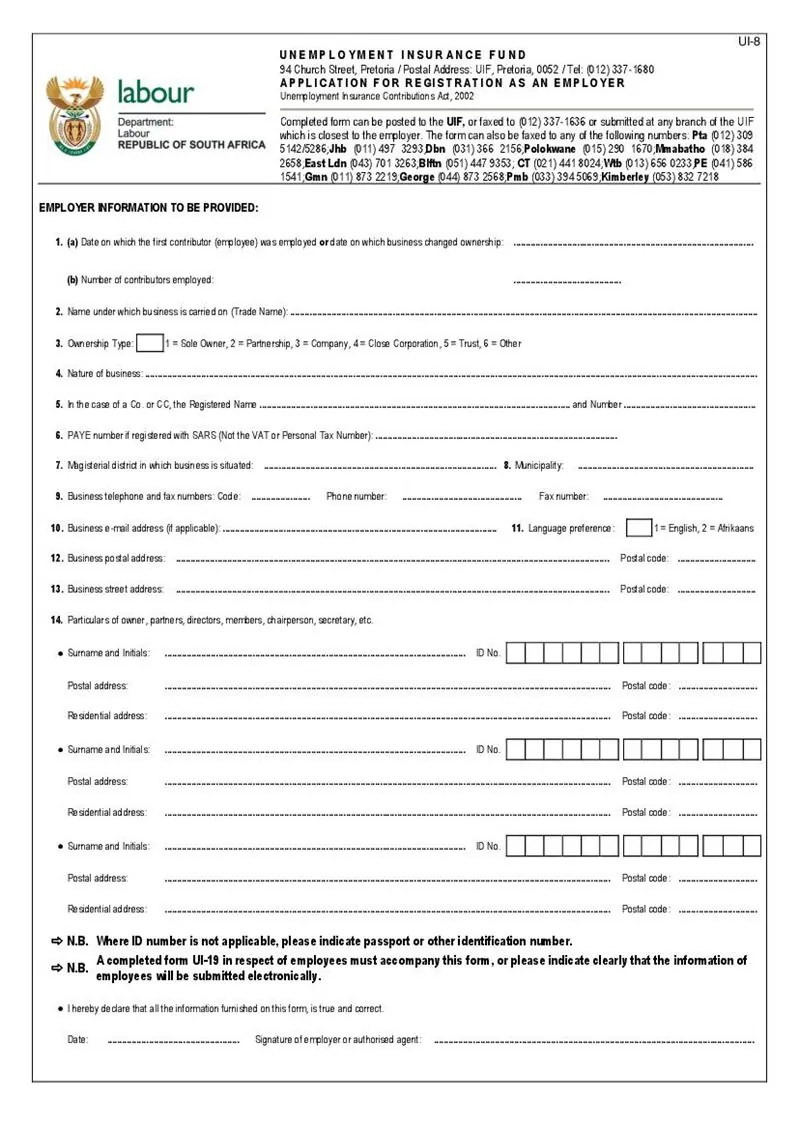
Employers register online through uFiling, the Department's free online portal at ufiling.labour.gov.za, which handles employer registration, monthly declarations and contribution payments. The UIF's own FAQ material also points employers to BizPortal as a registration route. Either way, the outcome is the same: the business is registered as an employer with the Fund and receives a UIF employer reference number, which is used on every future declaration and payment.
Paper registration is also possible at a labour centre, but online registration through uFiling is the route the Department presents as the standard one, and it is the route that lets you declare and pay from the same account afterwards.
What employers need to register
The exact fields depend on the route you use, but have the following ready before you start:
- The business or employer's identity details, and company registration details if the employer is a registered business.
- The employer's contact details and physical address.
- Each employee's identity number, start date and remuneration details — the employee declaration (UI-19) is the form that records these.
- Banking details for paying contributions.
Registering is only the first step. Once registered, the employer must submit a monthly declaration of employees and remuneration and pay the contributions. Contributions must reach the Fund before the 7th day of each month for the previous month — that deadline is stated in the Department's BizPortal UIF FAQ. A declaration for March, for example, is due by 7 April. Missing the monthly deadline is how an employer's record falls behind, and it is also how an employee's claim later runs into trouble at verification.
After registration: the monthly rhythm
Registration is a once-off step; declarations and payments are monthly, for as long as you employ people. Each month: declare who worked and what they were paid, calculate 2% of each employee's remuneration (1% from the employee, 1% from the employer, up to the published earnings ceiling), and pay the total by the 7th. Keep a copy of every declaration and every proof of payment. If an employee later claims, the Fund will check exactly this record.
Registration 3: Domestic employers
The 24-hour rule for households
If you employ a domestic worker, nanny, gardener, housekeeper or carer in your home for more than 24 hours a month, you must register with the UIF and pay monthly contributions. This has applied to domestic workers and their employers since 1 April 2003, as confirmed in the Government's Vuk'uzenzele UIF guide. It does not matter that the work is in a private household, or that the worker is part-time — once the 24-hour threshold is crossed, registration is compulsory.
The contribution is the same as for any other employment: 2% of the worker's monthly remuneration, made up of 1% deducted from the worker's pay and 1% added by you as the employer, paid by the 7th of each month for the previous month.
How domestic employers register
There are two main routes:
Online through uFiling. Create a user account on uFiling, register yourself as a Domestic Employer, and add your worker as an employee. At least one employee must be added to complete the registration. Once processed, the Fund emails you your employer reference number. From then on you submit declarations and pay contributions from the same dashboard.
On paper. Download and complete two forms from the Department's website: the UI-8D, which is the application for registration as an employer of workers in a private household, and the UI-19, which declares your employee's details — name, identity number, start date and wage. The UI-8D on its own registers an employer with no employees, so the two forms travel together. Completed forms can be submitted by email to the UIF's dedicated domestic-employer mailbox, by post, or handed in at a labour centre.
What domestic employers need
- Your own identity document or passport number.
- The date your first domestic worker started.
- Your contact details and home address.
- For the UI-19: your worker's 13-digit identity number, gross monthly wage and start date.
- The worker's wage must be at least the national minimum wage — the minimum cannot be reduced by deductions for food, transport or accommodation.
What happens if you do not register
The UIF's own FAQ material is direct about the consequences of not registering: penalties and interest can apply under the Contributions Act, and workers are advised to report employers who do not register. Beyond the legal consequences, there is a practical one: if you dismiss the worker later, you may be liable for benefits the worker cannot claim because no contribution record exists. Registering late is better than never registering, but it does not erase the months that were missed — those are a matter to sort out with the Fund.
Which registration is yours?
| Your situation | Registration | Main route |
|---|---|---|
| You are an employee | Employer registers you; you register as a work seeker when claiming | UIF Online for the claim |
| You employ staff in a business | Employer registration | uFiling (or BizPortal) |
| You employ someone in your home for 24+ hours a month | Domestic employer registration | uFiling as a Domestic Employer, or UI-8D + UI-19 on paper |
If you are in two categories at once — for example, you run a business and also employ a domestic worker at home — those are two separate registrations. The household registration does not cover the business, and the business registration does not cover the household.
Common registration problems and fixes
"I registered online but never received a reference number." Check the email address you registered with, including the spam folder, and confirm that you added at least one employee — a domestic employer registration is not complete without one. If nothing arrives, follow up through uFiling or at a labour centre with your identity number.
"My employer says I am registered, but the Fund has no record of me." Ask your employer for the UI-19 or the declaration record, and check your payslips for UIF deductions. If deductions were made but no record exists, raise it with the UIF with your payslips as evidence.
"I work for several households, each under 24 hours a month." Each employer must look at the hours you work for them. If no single employer reaches 24 hours a month with you, you are generally outside the system for those jobs. If one employer crosses 24 hours, that employer must register you. This is a situation worth confirming with the UIF, because the hours add up differently from what people expect.
"I registered, but my declarations are behind." Bring the declarations up to date through uFiling or at a labour centre, and pay what is outstanding. Late declarations attract penalties and interest, and they are also what delay an employee's claim later — fixing them now protects both sides.
Conclusion
UIF registration is three different processes wearing one name. Employees are registered by their employers and register as work seekers when they claim. Employers register once through uFiling or BizPortal and then declare and pay every month by the 7th. Domestic employers register the household — online as a Domestic Employer, or with the UI-8D and UI-19 on paper — once the worker passes 24 hours a month. Work out which one you are, follow that route only, and keep the reference number and every declaration. Registration is the foundation: everything the Fund can later do for a worker depends on the record it creates.
Frequently asked questions
Tap a question to see the answer.
Not in the way employers do. Your employer registers you as an employee and pays the contributions. Your own registration step comes when you need to claim: you register as a work seeker and submit the claim through UIF Online. If your employer never registered you, that is the employer's registration to fix.
No fee is described for the registration step itself — the cost of UIF is the monthly contributions, 1% from the employee and 1% from the employer. Be cautious of anyone who asks you to pay a fee to register or to release a registration; UIF services are free, and registration is done through uFiling, BizPortal or a labour centre.
The UI-19 is the employer's declaration of employees. It lists each worker's identity number, pay, hours and start or end date, and employers submit it monthly. Employees need a copy of it, or the information on it, to support a claim after leaving a job. For domestic employers it accompanies the UI-8D registration form.
The UI-8D is the application for registration as an employer of domestic employees — for private households only, not businesses. It registers the household as a domestic employer and generates the UIF employer reference number. It must be submitted with a UI-19 for the worker.
Your contribution record will be missing, which can delay or block a claim. Gather your payslips and proof of employment and raise it with the UIF. If UIF was deducted from your pay but never paid over, that is a matter for the Fund to pursue with the employer.
Employer registration through uFiling is described in UIF FAQ material as finalised immediately once submitted, with a confirmation issued afterwards. Paper registrations take longer because the forms must be received and processed. If you have heard nothing after a paper submission, follow up with the reference details of your submission rather than submitting a second registration.