

UIF Calculator: Work Out Your Contribution and Estimate Your Benefit
When someone searches for a "UIF calculator", they usually mean one of two different things. Some people want to know what is deducted from their salary every month. Others want to know what the Fund might pay them if they lose their job or go on maternity leave. These are two different calculations, they need different inputs, and they give different kinds of answers — one is exact, the other is only an estimate.
This guide explains both, shows you how each one works with worked examples, and — just as importantly — explains why a benefit estimate is never a promise of what you will actually receive.
Which calculator do you need?
| What you want to know | Calculator | How exact is the answer? |
|---|---|---|
| What is deducted from my salary each month? | Contribution calculator | Exact, once you know your gross salary |
| What might UIF pay me if I claim? | Benefit estimate calculator | An estimate only — the Fund decides the real amount |
| What will my employer pay? | Contribution calculator | Exact, same method as your share |
If you only want to check your payslip deduction, you need the contribution calculator and you can stop after the next section. If you want to plan around a possible claim, read the benefit section carefully, because that is where most misunderstandings happen.
UIF Payout Calculator
Estimate onlyMethod: daily income = monthly salary × 12 ÷ 365; replacement rate = 29.2 + 7,173.92 ÷ (232.92 + daily income), kept within the reported 38–60% limits. The formula and limits are reported by independent calculators citing the Unemployment Insurance Act — the Act text was not verified in this research pass, so treat the result as an estimate, not a promise.
UIF Contribution Calculator
ExactThe 1% employee / 1% employer split is confirmed on the SARS UIF page. The ceiling is set by regulation and can change — the figure R17,712 (from 1 June 2021) is reported by secondary sources and was not verified directly on sars.gov.za in this research pass, so check the current figure on SARS or Department material.
UIF Payment Calculator
Estimate onlyEstimate only, using the same reported method as the payout calculator. Credit days are capped at 365 in a four-year period. The Fund works from your declared earnings history, not the salary you type here.
The contribution calculator: what is deducted from your pay
How contributions work
UIF is funded by contributions from both sides of the employment relationship. The employee contributes 1% of their remuneration, and the employer contributes a further 1% — a total of 2% paid to the Fund. The employer deducts the employee's 1% from the salary and pays both shares over. This 1% employee share and 2% total are confirmed on the SARS UIF page, the official SARS guidance on the Fund.
Contributions are not calculated on unlimited earnings. They are calculated only up to a published earnings ceiling, so very high earners do not pay 1% of their full salary. The ceiling is set by regulation and can change, so always check the current figure on SARS or Department of Employment and Labour material rather than relying on a figure in an old article — including this one.
Worked examples
These examples use salaries below any published ceiling, so the arithmetic is straightforward: 1% of the gross monthly salary.
Example 1: gross salary of R10,000 a month. Your contribution is 1% of R10,000, which is R100 a month. Your employer adds another R100. The Fund receives R200 a month for you.
Example 2: gross salary of R15,000 a month. Your contribution is 1% of R15,000, which is R150 a month. Your employer adds another R150. The Fund receives R300 a month for you.
Example 3: gross salary of R5,000 a month. Your contribution is R50 a month, and your employer adds R50. The Fund receives R100 a month for you.
What to enter in a contribution calculator
A contribution calculator needs very little from you:
- Your gross monthly salary — your pay before tax and before any deductions, not your take-home pay. Entering your take-home pay is the most common mistake and it makes the answer too low.
- Whether the salary is above the earnings ceiling — a good calculator applies the ceiling automatically. If it does not mention a ceiling at all, treat its result with caution.
Checking the answer against your payslip
Once you have the calculator's answer, compare it with your payslip. Your payslip should show a UIF deduction equal to 1% of your gross salary (up to the ceiling). If the payslip shows no UIF deduction at all, or a very different amount, that is worth following up with your employer — it may mean you were never registered, or that the deduction is being calculated on the wrong figure. Keep your payslips: they are the simplest proof of what was deducted, and they help if there is ever a dispute about your contribution record.
The benefit calculator: estimating what UIF might pay you
Why this one is only an estimate
A benefit calculator cannot tell you what the Fund will pay you. It can only estimate, because the real amount depends on facts the calculator does not have: your declared earnings history as recorded by the Fund, the credit days you have actually built up, the benefit type you are claiming, and whether you meet the eligibility rules for that benefit. The Fund works all of that out from its own records when you claim.
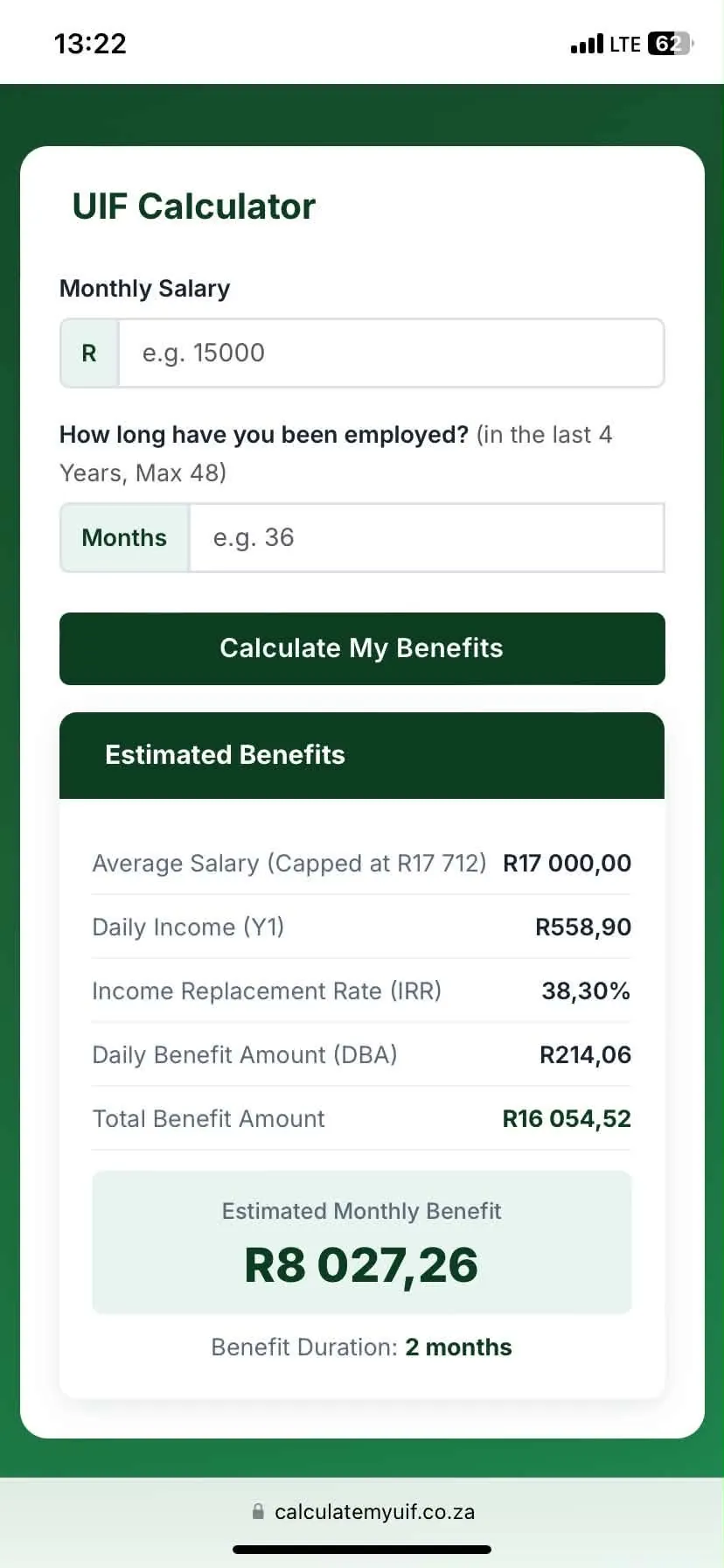
Use a benefit estimate for planning — for example, to understand roughly what level of support a claim might provide. Do not use it to promise a payment to a creditor, sign a financial commitment, or decide that you can manage without other income. If the estimate and the Fund's eventual decision differ, the Fund's decision is the one that counts.
What a benefit estimate is based on
Independent calculators that describe the statutory method explain it in the same broad steps:
- Your average earnings are converted to a daily income. Your monthly pay is multiplied by 12 and divided by 365, giving a daily income figure. Earnings above the published ceiling are counted only up to the ceiling.
- A replacement rate is applied. Instead of replacing your full income, UIF pays a percentage of your daily income. The percentage is higher for lower earners and lower for higher earners, worked out by a formula published under the Unemployment Insurance Act. Independent calculators that cite the Act describe the formula as: rate = 29.2 + 7,173.92 ÷ (232.92 + daily income), kept within an upper and lower limit.
- The result is paid for your available credit days. Credit days build up as you work and contribute, up to a maximum of 365 days in a four-year period. The first portion of those days is paid at the replacement rate, and any days beyond that portion are paid at a lower flat rate.
- Maternity claims work differently. Maternity benefits use a different flat rate from unemployment benefits, and are paid for a limited number of days.
The figures and limits in this method — the ceiling, the replacement-rate limits, the number of days paid at each rate, and the credit-day accrual rule — are set by legislation and regulation and can change. This guide deliberately does not state them as settled rand or percentage figures, because they were not verified against the Act or an official source in this research pass. They are listed as verification items in Section 5. A calculator that shows you its figures and its method, and tells you when they were last checked, is more trustworthy than one that hides them.
A worked example (illustration only)
Take a worker earning R10,000 a month in gross salary.
- Daily income: R10,000 × 12 ÷ 365 = about R329 a day.
- Applying the formula cited above gives a replacement rate of roughly 42% for that daily income.
- Daily benefit: about 42% of R329 = about R138 a day.
- Monthly equivalent: about R138 × 30 = roughly R4,200 a month.
This is an illustration of the method, not a prediction. It assumes a full credit-day record, the correct declared earnings, and eligibility for unemployment benefits. In a real claim, the Fund would use your declared earnings history, not the salary you type into a calculator, and the amount could be higher or lower.
What to enter in a benefit calculator
A benefit calculator needs more from you than a contribution calculator, and the quality of its answer depends on the quality of what you enter:
- Your average monthly salary before deductions — ideally the average the Fund would see from your declared earnings, not just your most recent month.
- How long you have contributed in the last four years — this drives your credit days. Four years of contributions gives the maximum; shorter periods give fewer days.
- Benefit days already claimed in this four-year cycle — days already paid to you reduce what is left.
- The benefit type — unemployment, illness, maternity, adoption and parental claims are not all calculated the same way.
If a calculator asks for none of this and still gives you a precise-looking answer, that precision is false. A calculator that asks for more detail is not being difficult; it is being honest about what the answer depends on.
Why a calculator result can differ from the real payment
There are several ordinary reasons:
Declared earnings differ from your salary. The Fund works from the earnings your employer declared, averaged over your recent months of work. If your employer declared a lower figure, or declared you late, the Fund's calculation starts from that lower figure.
Your credit days are fewer than you think. Credit days depend on your contribution record over the last four years. Gaps in employment, periods when you were not declared, or days already paid in an earlier claim all reduce the days available.
The benefit type matters. A maternity claim and an unemployment claim for the same person are calculated differently, so a calculator set to the wrong benefit type gives the wrong answer.
The figures changed. Ceilings and rates are set by regulation and change over time. A calculator using last year's figures gives last year's answer.
Eligibility is separate from arithmetic. A calculator assumes you qualify. The Fund still has to decide that you do. If you do not meet the rules for the benefit — for example, the reason your employment ended — the calculated amount is irrelevant.
If the Fund's decision differs from your estimate, ask for the basis of the calculation rather than arguing about the calculator's figure. The Fund's records and the legislation are what decide it.
How to use a UIF calculator safely
- Use the contribution calculator to check your payslip. That answer is exact and verifiable.
- Use the benefit calculator only as a planning estimate, and treat the result as a range, not a promise.
- Check that the calculator shows its method and the date its figures were last verified. If it shows neither, find one that does.
- Enter your gross salary, not your take-home pay.
- Never enter your identity number, banking details or passwords into an independent calculator website. A genuine calculator only needs salary and contribution history.
- Never pay for a UIF calculation. UIF services are free, and the Fund itself decides your benefit.
Conclusion
A UIF calculator is two tools in one name. The contribution calculator is simple and exact: 1% from you and 1% from your employer, up to the published ceiling. The benefit calculator is a planning aid: it shows roughly what a claim might provide, using your salary and contribution history, but it cannot promise a figure. Use the first to check your payslip, use the second to plan with caution, and remember that only the Fund — working from your declared record and the law — decides what you are actually paid.
Frequently asked questions
Tap a question to see the answer.
No. A contribution result is exact arithmetic on the salary you enter, but a benefit result is an estimate. The Fund decides the real amount from your declared earnings history, your credit days and the benefit rules. Treat any benefit figure as a planning guide, not a promise.
Your gross monthly salary — your pay before tax and before deductions. Entering your take-home pay gives too low a result. For a benefit estimate, use your average monthly earnings over recent months rather than a single unusually high or low month.
The most common reasons are that you entered your take-home pay instead of your gross pay, that your salary is above the earnings ceiling so the deduction is capped, or that your employer calculated the deduction on a different figure. If the payslip shows no UIF deduction at all, ask your employer whether you are registered.
Only if it has a maternity setting. Maternity benefits are calculated differently from unemployment benefits, using a different rate and a limited number of days. A calculator that only handles unemployment claims will give the wrong answer for a maternity claim.
UIF contributions apply to employees, with an employer who deducts and pays them. A person who is self-employed and has no employer generally does not pay UIF on their own earnings. If you are unsure whether you count as an employee for UIF purposes, confirm with the Department of Employment and Labour or SARS rather than relying on a calculator.
No. A calculator works from the figures you enter. The Fund works from the earnings your employer declared. If the declared record is missing or wrong, the Fund's calculation will differ from yours — and the missing record can also delay or block the claim itself. Raise a missing declaration with the UIF.