
UIF Login: How to Log In to UIF Online in South Africa
Logging in to UIF should be a short job: open the right portal, enter your details, and reach your claim. In practice, many South African workers land on the wrong website first, because the UIF moved its employee claims to a new portal and the old one is still visible in search results. This guide explains which portal to use, what you need before you sign in, how to log in step by step, and what to do when login fails.
The quick answer: use UIF Online for employee claims
If you are an employee claiming UIF benefits, or checking a benefit claim you have already submitted, log in through UIF Online at uifonline.labour.gov.za.
Do not start a benefit claim on uFiling. The Department of Employment and Labour launched UIF Online on 1 April 2025 to replace the old uFiling employee claims portal, and the old employee claims portal was closed on 20 May 2026. Claims that were submitted on the old portal were kept and moved to the new system — the Department has said no applications were lost — but new employee benefit claims are made and tracked on UIF Online.
uFiling (ufiling.labour.gov.za) is still the portal employers use for registrations, declarations and contributions. If you are an employer, your login is a different task from an employee's claim login, and this article is written for employees and claimants. If you are unsure which one you are, the question to ask is simple: are you claiming benefits for yourself, or are you declaring employees and paying contributions for a business? Benefits for yourself means UIF Online.
UIF Status Check Tool
GuideStatus wording can change, and the note attached to your claim matters more than the label. Never pay any website to check a status for you, and never enter your ID number on a site that is not an official portal.
What you need before you log in
Have these ready before you open the portal. It saves you from starting, stopping, and starting again.
- Your 13-digit South African ID number. This is the main way the system identifies you.
- The password for your UIF Online account. If you have never used UIF Online before, you need to register first — there is nothing to log in with yet.
- The cellphone number and email address you registered with. Keep the phone nearby, because the portal may ask you to confirm a code sent to you.
- Your UIF claim or case reference number, if you have one. It is useful when you need help, but you do not need it simply to log in.
If any of your registered contact details have changed since you last used the system, sort that out before you need urgent access. A login that sends its confirmation to an old number is one of the most common reasons people get stuck, and it is much easier to fix when you are not in a hurry.
How to log in to UIF Online, step by step
- Type the address yourself. Open your browser and type
uifonline.labour.gov.zainto the address bar. Do not click a link in a search advert, a message, or a social media post to reach a login page. Lookalike login pages exist, and a search result is not proof that a page is official. - Check you are on the right site. The address should be on the
labour.gov.zadomain. UIF Online is a free government service. If a page asks you to pay to log in or to "process" your login, leave it — that is not the official portal. - Choose Login, not Register. Register is only for first-time users. If you already have an account, choose the login option.
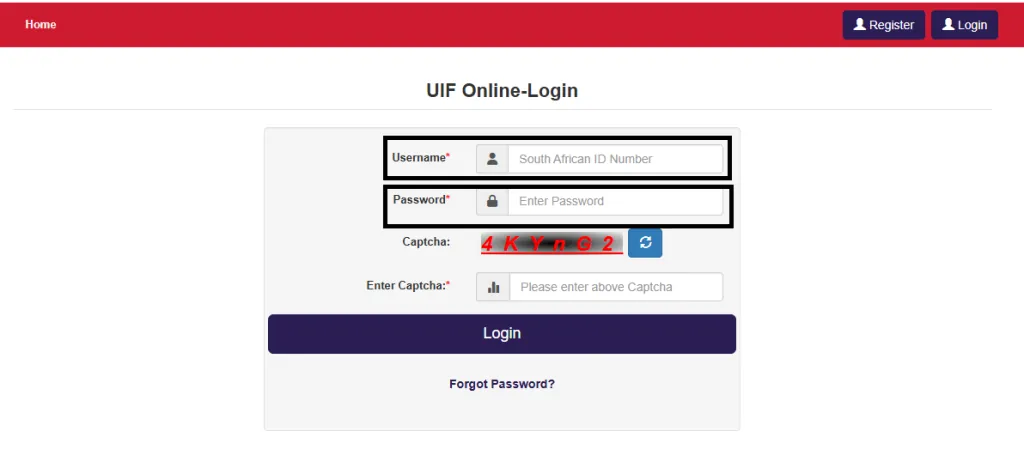
- Enter your login details. Enter your username or ID number and your password, exactly as you set them up. Passwords are case-sensitive, so check that caps lock is off before you decide the password is wrong.
- Complete any confirmation step the portal shows. This may include a captcha or a confirmation code. Follow only the instructions on the portal itself.
- Open your claim from your dashboard. Once you are in, look for your claim or application on your account dashboard. That is where your claim progress and payment information are shown.
If the portal is slow or will not load, wait and try again later rather than trying a different website. Government portals get very busy, especially early in the month, and a slow page is not a sign that you should log in somewhere else.
Registering for the first time
If you have never used UIF Online, you need to register before you can log in. Registration asks for your personal details, including your ID number, names, cellphone number and email address. Use details that match your ID and that you still have access to, because the system will use them to contact you and to confirm your identity later.
Register once, with one account. Creating a second account because the first one is slow or because you forgot a password usually makes things worse, not better — it can split your records and create confusion about which account holds your claim. If you think you may already have an account, use the password reset option first.
If you forgot your password
Use the Forgot Password or reset option on the UIF Online login page. You will be asked for your ID number, and the portal will guide you through the reset using your registered contact details. Check both your email inbox and your phone, including spam and junk folders, before you conclude that nothing arrived.
If no reset message arrives, do not keep requesting new ones in quick succession. Instead, check that you are using the email address and cellphone number you actually registered with, and that you are on UIF Online rather than the old uFiling claims pages. If it still does not arrive, contact the UIF call centre on 0800 030 007 or visit your nearest Labour Centre with your ID. The call centre number is widely reported as toll-free; its opening hours are reported as weekdays 07:30 to 16:00, but confirm the hours when you call, as they can change.
I applied on uFiling before May 2026 — what happens to my login?
If you submitted a claim on the old uFiling employee claims portal before it closed on 20 May 2026, the Department has said those applications were stored and moved into the new UIF Online platform, and that none were lost. What that means in practice is that you should look for your claim on UIF Online, not keep logging in to uFiling to find it.
If your claim does not appear on UIF Online, do not submit a second claim on the spot. First check that you are logged in to the correct account — the one linked to the ID number on the claim — and then contact the UIF call centre or the Labour Centre handling your claim, with your ID number and any reference number from your old submission. A reference number from the old system is useful evidence, but it is not by itself proof that the claim is active on the new system. Confirm that the claim, its documents and its history are visible on UIF Online.
Common login problems and how to fix them
You keep landing on the wrong portal
This is the most common problem in 2026, and it is not your fault — old uFiling pages still rank highly in search. The fix is to stop searching and type uifonline.labour.gov.za yourself. Bookmark the correct page once you are sure you have it, and use that bookmark next time.
The portal says your details are incorrect
Re-enter your ID number slowly, digit by digit. A single wrong digit is the usual cause. Then check your password: caps lock off, no extra space at the start or end, and the password for UIF Online specifically — not the password for your email or for uFiling. If it still fails, use the password reset option rather than guessing repeatedly.
You never receive a confirmation code
Check that the phone is switched on, has signal, and is the number you registered with. Check that your inbox is not full and that messages are not being filtered. If the code still does not arrive, try again later — the portal can be slow at busy times — and if the problem persists, contact the call centre.
The page will not load or keeps timing out
Try a different browser, or the same browser in a private window, and clear your cache if the page looks broken or half-loaded. Try again outside peak hours. Do not download an app or use a third-party site that promises a faster login; the official route is the website itself.
You are asked to pay to log in or check a claim
Stop. UIF Online is a free service, and the Department does not charge you to log in, apply, or check a claim. Any person or website asking for payment to log you in, "release" your claim, or speed up your payment is not acting for the UIF. Never share your password or any confirmation code with anyone who offers to log in for you.
Staying safe when you log in
Your UIF login protects money that belongs to you, so treat it the way you would treat online banking. Never share your password or a one-time code, even with someone who says they work for the UIF. The UIF will not ask you for your password. Log out when you finish, especially on a shared or borrowed phone or computer, and do not save your password on a device other people use.
Be suspicious of messages that claim your UIF payment is ready but you must click a link, pay a fee, or confirm your banking details first. The official portals do not work that way. If you are unsure about a message, ignore the link in it and go to UIF Online by typing the address yourself, or call the call centre on 0800 030 007.
What logging in does not do
Logging in shows you the position of your own claim. It does not approve a claim, speed up a payment, or guarantee that money will be paid. A claim still has to be assessed, and payments still depend on the claim being approved and your details being correct. If your status has not changed, that usually means the claim is still in the process — logging in more often will not move it faster. If you believe something is wrong, such as documents showing as missing when you submitted them, that is the point to contact the call centre or Labour Centre, with your ID and reference numbers ready.
Conclusion
UIF login in South Africa now means UIF Online. Type uifonline.labour.gov.za yourself, log in with the account linked to your ID number, and check your claim there. If you applied on uFiling before May 2026, look for your claim on the new portal instead of going back to the old one. And if login fails, work through the basics first — the right portal, the right account, the right password — before you assume something is wrong with your claim. If you are still stuck, the call centre and your nearest Labour Centre are the official routes for help, and neither of them will ever ask you to pay to log in.
Frequently asked questions
Tap a question to see the answer.
Use UIF Online at uifonline.labour.gov.za for employee benefit claims and for checking a claim you have submitted. uFiling is for employers' registrations, declarations and contributions. If you are claiming benefits for yourself, UIF Online is the correct portal.
No, not for employee benefit claims. The employee claims side of uFiling closed on 20 May 2026, and claims are now made and tracked on UIF Online. Old claims were moved to the new system, so check UIF Online first.
Use the Forgot Password or reset option on the UIF Online login page and follow the instructions using your registered ID number and contact details. If no reset message arrives, check that you are using the details you registered with, then contact the UIF call centre or visit a Labour Centre.
Yes. UIF Online is a free government service. You should never be asked to pay to log in, apply, or check your claim. Anyone asking for payment for UIF access is not acting for the UIF.
You should not share your password or confirmation codes with anyone, including someone offering to log in on your behalf. If you need help using the portal, ask for help in person at a Labour Centre, or contact the call centre, rather than handing over your login details.
According to the Department of Employment and Labour, no. Applications submitted on the old portal were stored and moved into UIF Online. Check for your claim on UIF Online, and if it is not visible, contact the call centre or Labour Centre with your ID number and your old reference number.