

UIF Forms: Every Form You Need to Claim in South Africa
A UIF claim is, in practice, a pile of paperwork — and the paperwork is where most claims stall. The form you complete yourself is only one part of it. Your employer completes other forms, your bank confirms another, and a doctor or a court may need to supply documents for some benefit types. If one piece is missing, or the wrong form is submitted, the claim can sit unresolved while you wait.
This guide lists the UIF forms you are likely to meet, explains who completes each one, and shows how to submit them. It reflects the current split between the two official systems: employee benefit claims now go through UIF Online, while employer declarations and contributions remain on uFiling for now. Where the sources disagree about a form — and they do, on two form numbers — this guide says so rather than picking a side. Check the title printed on the form itself before you rely on a number you saw online.
Quick answer: the forms most claimants need
| Form or document | Who completes it | What it is for |
|---|---|---|
| UI-2.1 | You, the claimant | Application for unemployment benefits |
| UI-19 | Your employer | Employer's declaration of your employment, pay and reason for leaving |
| UI-2.7 | Your employer | Record of remuneration received while you were employed |
| UI-2.8 | You, with your bank | Banking details so benefits can be paid into your account |
| Identity document | You | Your 13-digit South African ID or passport |
| Proof of registration as a work seeker | You, at a Labour Centre | Shows you are registered as looking for work |
| Payslips and service certificate | Your employer | Evidence of your pay and your employment history |
| Medical certificate, court order or death certificate | Doctor, court or Home Affairs, depending on the benefit | Supporting proof for illness, adoption or dependants' claims |
Not every claim needs every item in this table. The exact set depends on the benefit you are claiming, which is covered in the section on forms by benefit type below.
UIF Forms Finder
FinderForm numbers: the salary schedule form number is disputed between sources (UI-2.7 vs UI-2.8) — ask for the document by its purpose, not only by number, and confirm the number with the UIF or a Labour Centre.
How UIF forms work now: UIF Online, uFiling and paper
Understanding which system you are dealing with saves more time than any single form tip. There used to be one answer — uFiling — for almost everything. That is no longer true.
The Department of Employment and Labour launched UIF Online on 1 April 2025, and the legacy employee claims portal on uFiling was officially closed on 20 May 2026. Employee benefit claims are now made and tracked on UIF Online, at uifonline.labour.gov.za. Applications that had been submitted through the old uFiling claims portal were kept and are being migrated into the new system; the Department has said no applications were lost in the closure.
uFiling, at ufiling.labour.gov.za, remains operational for the employer side: employer registrations, monthly declarations and contributions. The Department has said those employer services were expected to migrate to UIF Online as well, but whether that migration has finished is something to confirm on the official sites at the time you read this — see the flags in Section 5.
What this means for forms in practice:
- If you are claiming benefits as an employee or former employee, start on UIF Online. Do not start a new claim on the old uFiling claims screens.
- If you are an employer declaring staff or paying contributions, uFiling is still the working system for that job.
- If you are claiming in person, a Labour Centre can supply paper forms and accept a claim. This is also the route to use when an employer no longer exists or will not supply an employer form, because the Labour Centre can advise what to submit instead.
A warning that applies to every form on this page: do not download UIF forms from a random website and assume they are current. Form versions change, and several third-party sites host old copies or mix up form numbers. The safest sources are UIF Online, uFiling, a Labour Centre, and the Department of Employment and Labour's own website, labour.gov.za.
The four forms almost every unemployment claim involves
UI-2.1 — the application form (you complete it)
The UI-2.1 is the application for unemployment benefits, made under section 17(1) of the Unemployment Insurance Act 63 of 2001. This is the form you, the claimant, complete to ask for unemployment benefits. It records your identity details, your employment history, and a declaration that you are unemployed or working reduced hours.
On UIF Online, the application is completed as an online submission rather than on a paper UI-2.1. If you claim in person at a Labour Centre, the paper UI-2.1 is the form you will be given. Either way, the information it asks for is the same: who you are, where you worked, when the work ended, and why.
UI-19 — the employer's declaration (your employer completes it)
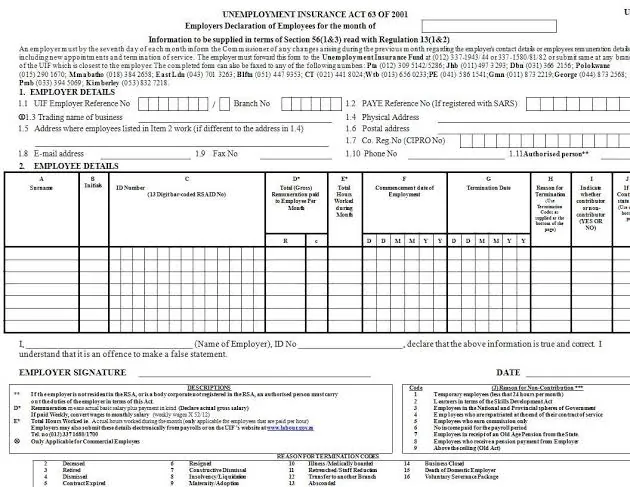
The UI-19 is the employer's declaration of employees. It lists each worker's identity number, pay, hours and start and end dates, and it records the reason the employment ended. Employers also use the UI-19 for their monthly declarations, which are due by the 7th of each month for the preceding month.
For a claim, the UI-19 is the document that proves you were employed, what you earned, and why you left. Your employer is required to give you a completed UI-19 when your employment ends. If your employer refuses, delays, or has closed down, do not simply wait — take your payslips, contract, and any proof of termination to a Labour Centre and explain the position. The Department can follow up with the employer, and the Labour Centre can advise what to submit in the employer's place. There is a separate section on this problem below.
UI-2.7 — the remuneration record (your employer completes it)
The UI-2.7 is the record of remuneration received by the employee while still in employment. It shows what you were paid during the period the UIF looks at, and it supports the calculation of your benefit. Your employer completes it. The UI-2.1 application form itself asks whether your employer has completed a UI-2.7, which shows how closely the two forms are linked.
UI-2.8 — the banking details form (you complete it, with your bank)
The UI-2.8 is the banking details form. It records the bank account into which your benefits should be paid, and it is confirmed by your bank. Without a correctly completed banking form, an approved claim cannot be paid, so this form deserves the same care as the application itself. Check every digit of the account number, and make sure the account is in your name.
A real point of confusion: UI-2.7 and UI-2.8 are sometimes swapped
You will find guides online that describe UI-2.7 as the banking form and UI-2.8 as the salary form — the exact reverse of the descriptions above. The form texts and the more careful guides agree with the version used in this article: UI-2.7 is the remuneration record and UI-2.8 is the banking details form. But because the swap is common, do not rely on a number alone. When you are handed a form, read the title printed at the top of it: it should say what the form is for. If a guide tells you to complete a "UI-2.7 banking form", treat that guide as unreliable on form numbers. This conflict is recorded as a verification flag in Section 5.
Forms by benefit type
The forms change with the benefit, because the thing you must prove changes. The table below is a starting checklist, not a final instruction — confirm the current form for your benefit type on UIF Online or at a Labour Centre before you submit.
| Benefit type | Main application form | Key supporting forms and documents |
|---|---|---|
| Unemployment benefits | UI-2.1 | UI-19, UI-2.7, UI-2.8, ID, payslips, service certificate, proof of registration as a work seeker |
| Reduced work time (still employed, hours or income reduced) | UI-2.1, reduced work-time section | UI-19, UI-2.7 where required, UI-2.8, salary schedule or payslips showing the reduction |
| Maternity benefits | A different application form from the unemployment form | UI-19, UI-2.7, UI-2.8, medical certificate from a doctor or the baby's birth certificate, payslips |
| Illness benefits | Application form for illness benefits | UI-19, medical certificate from your doctor, UI-2.8, payslips |
| Adoption benefits | Application form for adoption benefits | UI-19, court order for the adoption, UI-2.8, payslips |
| Dependants' benefits (after a contributor's death) | Application form for dependants' benefits | UI-19, death certificate, proof of the relationship to the deceased, UI-2.8 |
A few notes on this table. First, the maternity, illness, adoption and dependants' application forms carry different numbers from the UI-2.1, and older Department guidance gives those numbers — but those numbers have not been verified against a current official source in this pass, so they are not printed here as facts. They are listed as a verification flag in Section 5. Ask UIF Online or a Labour Centre for the current form for your benefit type rather than trusting a number from an old guide.
Second, a salary schedule is sometimes requested as well. It is an employer document showing your salary history and changes over your employment, and it is dealt with in detail in the companion article on UIF salary schedule forms. It is not a routine requirement for every claim; it is usually requested when the UIF needs to verify earnings or resolve conflicting records.
Third, time limits apply to claims. The exact deadline differs between sources — one official-rights summary gives a longer window than several guides — so no number is stated here. Ask UIF Online or a Labour Centre what the current deadline is for your benefit type, and apply as soon as you can rather than testing the limit. The conflict is recorded in Section 5.
Who completes what: the full picture
| Person or organisation | What they complete or supply |
|---|---|
| You, the claimant | The benefit application form; the banking details form; your ID; proof of registration as a work seeker |
| Your employer | UI-19; UI-2.7; salary schedule if requested; service certificate; payslips |
| Your bank | Confirmation of the banking details on the UI-2.8 |
| Your doctor | Medical certificate for illness or maternity claims |
| A court | Adoption order for adoption benefits |
| The Department / Labour Centre | Work seeker registration; follow-up forms issued during a claim; advice when an employer form is missing |
If you are an employer rather than a claimant, your forms are different again: employer registration declarations, monthly UI-19 declarations of employees, and contribution payments, submitted through uFiling. Domestic employers are included in the employer system.
Where to get UIF forms
- UIF Online (uifonline.labour.gov.za): the online route for employee benefit applications. The application is completed on the portal rather than downloaded as a paper form.
- uFiling (ufiling.labour.gov.za): the employer route for registrations, declarations and contributions.
- A Labour Centre: paper forms, including the UI-2.1, and in-person help with a claim. This is the most reliable place to get a paper form and to confirm which form your benefit type currently needs.
- The Department of Employment and Labour website (labour.gov.za): the official source for Department forms and notices.
No direct download link for any individual form is printed in this article, because no official form download address was verified during this research pass. A link to a form that has moved or changed would be worse than no link. Go to the official sites above and follow their current forms or downloads section, or ask at a Labour Centre. This is recorded in Section 5.
How to submit UIF forms
- Gather everything before you start. Use the checklist in the next section. An incomplete submission is the most common reason a claim is delayed at the start.
- Decide your route. Online through UIF Online for an employee benefit claim, or in person at a Labour Centre if you prefer paper forms or need help.
- Complete the claimant forms yourself, carefully. Use your full names as they appear on your ID, and check every number — ID number, dates, account number — before you submit.
- Get the employer forms from your employer. Ask in writing, keep a copy of your request, and note the date. If the employer will not provide them, go to a Labour Centre with the evidence you do have rather than waiting indefinitely.
- Submit, and keep proof. Keep copies of every form you submit, and keep any reference number, receipt or confirmation you are given. Do not hand over your only original of any document.
- Follow up through the same channel. Check your claim status on UIF Online or through the official status-check routes, and respond promptly if the UIF asks for more documents.
Before you submit: checklist
- Identity document or passport, original and copy.
- Completed benefit application form for your benefit type.
- UI-19 from your employer, completed and signed.
- UI-2.7 remuneration record from your employer.
- UI-2.8 banking details form, confirmed by your bank.
- Recent payslips and your service certificate.
- Proof of registration as a work seeker.
- Benefit-specific documents: medical certificate, court order or death certificate, as applicable.
- Copies of everything, kept in a safe place.
Common problems with UIF forms, and what to do
My employer will not give me a UI-19
This is one of the most common UIF problems in South Africa. Ask for the UI-19 in writing so you have a record of the request. If the employer still refuses, or the business has closed, take your payslips, your contract or appointment letter, and any termination letter to a Labour Centre. The Department can follow up with the employer, and the Labour Centre can advise what alternative evidence to submit. Do not let a missing employer form stop you from starting the process.
I was given the wrong form
Form numbers are easily confused, and the UI-2.7/UI-2.8 swap described above is a real example. If a form's printed title does not match what you were told it was, stop and check: read the title on the form, compare it with the list in this guide, and confirm with UIF Online or a Labour Centre before you fill it in. Filling in the wrong form and submitting it costs more time than asking first.
My form is an old version from a third-party website
Do not use it. Form versions change, and an old version may ask for information the UIF no longer collects, or miss information it now requires. Get the form from UIF Online, uFiling, a Labour Centre or labour.gov.za.
My banking details were rejected
Check that the account number on the UI-2.8 matches your bank statement exactly, that the account is in your name, and that the bank has confirmed the details. A single wrong digit can stop a payment. If the details are correct and the form is still rejected, ask the Labour Centre or the UIF call centre what the exact reason is, rather than submitting the same form again unchanged.
I applied on uFiling and heard nothing
If you submitted an employee benefit claim through the old uFiling claims screens, note that the employee claims portal was closed on 20 May 2026. The Department has said applications submitted through the old platform were kept and are being migrated into UIF Online. Check the position on UIF Online, and if your claim does not appear there, contact the UIF call centre or visit a Labour Centre with your reference details. Do not submit a duplicate claim through a different channel until you have been advised to, as duplicate submissions can complicate a claim.
Conclusion
UIF forms look complicated because several different people complete them: you, your employer, your bank, and sometimes a doctor or a court. Once you know who completes what, the list becomes manageable. Get the application form for your benefit type, get the UI-19 and UI-2.7 from your employer, complete the UI-2.8 banking form with your bank, and gather your ID, payslips and work seeker registration. Use UIF Online for an employee benefit claim, uFiling for employer declarations, and a Labour Centre when anything is missing or unclear. And wherever a form number looks uncertain, trust the title printed on the form — not a number quoted on a third-party website.
Frequently asked questions
Tap a question to see the answer.
For unemployment benefits, the core set is the UI-2.1 application form, the UI-19 from your employer, the UI-2.7 remuneration record, the UI-2.8 banking details form, your ID, recent payslips and proof of registration as a work seeker. Other benefit types need different application forms and supporting documents, as listed in the table above.
The reliable sources are UIF Online, uFiling for employer forms, a Labour Centre for paper forms, and the Department of Employment and Labour website, labour.gov.za. No direct download link is given in this article because no official form download address was verified in this research pass. Avoid third-party sites offering form downloads, as their copies may be outdated.
Your employer completes the UI-19. It is the employer's declaration of your employment, pay and reason for leaving, and it is also used for the employer's monthly declarations. If your employer will not provide it, ask in writing and then take your other evidence to a Labour Centre.
The UI-2.7 is the record of remuneration received while you were employed, completed by your employer. The UI-2.8 is the banking details form, completed by you and confirmed by your bank. Some guides online swap these two numbers, so always read the title printed on the form itself.
You should start the process even if an employer form is missing, rather than waiting indefinitely. Take the evidence you do have — payslips, contract, termination letter and ID — to a Labour Centre and explain what is missing. The Department can follow up with the employer. Do not submit a claim you know to be incomplete without telling the Labour Centre what is missing and why.
No. They use different application forms and need different supporting documents, such as a medical certificate for illness or maternity, or a court order for adoption. The UI-19, UI-2.7 and UI-2.8 are still commonly part of the supporting set. Confirm the current application form for your benefit type on UIF Online or at a Labour Centre, as the form numbers in older guides have not been verified as current in this pass.