
UIF USSD: Check Your UIF Status Without Internet
Not everyone checking a UIF claim has mobile data, a smartphone, or a reliable connection. For those readers, the UIF USSD service is the fallback that matters: a phone menu you dial from any cellphone, with no internet and no app. This guide explains the UIF USSD code, how to use it, what it can and cannot show you, and what to do when it does not work.
The quick answer: dial *134*843#
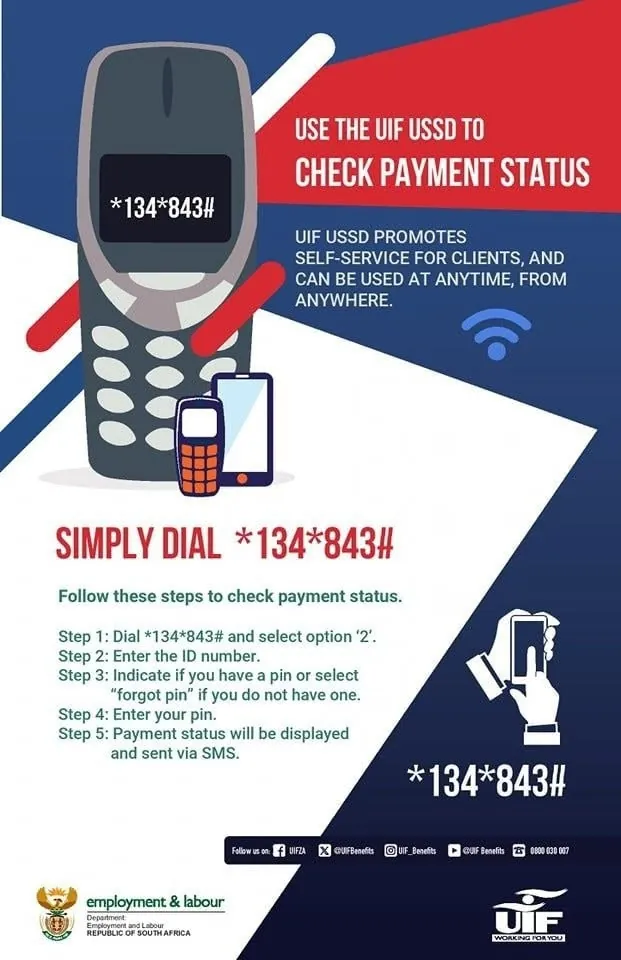
The UIF USSD code is *134*843#. The Department of Employment and Labour lists this as its UIF USSD channel. Dial it from any cellphone, follow the menu on your screen, and enter your ID number when asked.
A note on confidence, because it matters with a code: this article states the code on the basis that the Department lists it as its USSD channel, as reported by several independent sources that cite the Department's own contact pages and notices. The exact, current USSD menu was not read directly on an official Department page in this research pass, so the menu options below are described as reported, not as a word-for-word copy of today's menu. If the menu you see differs slightly from what is described here, trust the menu on your phone — it is the live service — and see Section 5 for what still needs an official check.
UIF Status Check Tool
GuideStatus wording can change, and the note attached to your claim matters more than the label. Never pay any website to check a status for you, and never enter your ID number on a site that is not an official portal.
What USSD is, and why it exists for UIF
USSD is the menu system that appears on your phone screen when you dial a code like *134*843# and press call. It works on basic handsets as well as smartphones, it does not need mobile data, and it does not need you to download anything. You answer by pressing numbers on your keypad — 1 for one option, 2 for another — and the next menu appears.
For UIF, that matters because many claimants check their status from places where data is expensive or the signal is weak. A USSD check uses the phone network itself, so it works where a website will not load. It is a checking service, not a full claims service: it is designed to give you a basic position on your claim or payment, not to replace the online portal.
How to use the UIF USSD code, step by step
- Use any cellphone. You do not need a smartphone, and you do not need mobile data or airtime for data. You need a phone with signal.
- Dial *134*843# and press call. Type the code exactly: star, 134, star, 843, hash. If you mistype it, the menu will not load — hang up and dial it again, slowly.
- Wait for the menu. A list of options will appear on your screen. Read it before you press anything. Menus can change, so do not press a number from memory or from an old guide.
- Choose the claim or payment status option. The menu is reported to include claim status and payment status, along with employee registration, payment continuation and general enquiries. Choose the option that matches what you want to know.
- Enter your ID number when asked. Enter your 13-digit South African ID number, digit by digit, and check it before you confirm. Your ID number is how the service finds your record.
- Read the reply on your screen. The service will show you a short status message. Read it fully before you close it — USSD screens disappear when the session ends, and you cannot scroll back to them later. Write down what it said, the date, and your reference number if one is shown.
- End the session. Once you have the information, exit the menu. If you are on a shared phone, make sure the session is closed so the next person does not see your details.
Keep your claim or case reference number nearby before you dial, in case the menu asks for it. You may not need it, but having it ready saves you from starting again.
What you can check with UIF USSD
According to the Department's USSD notice as reported by independent sources, the menu covers:
- Claim status — the position of your UIF claim.
- Payment status — the position of a UIF payment.
- Employee registration — registration-related enquiries.
- Payment continuation — continuing a payment where the service offers it.
- General enquiries — basic questions about UIF services.
Treat that list as reported rather than guaranteed, because the live menu is the authority and it can change. The important point is the shape of it: USSD is for short status answers and simple enquiries. It is not a way to submit a full claim, upload documents, or change your banking details. For those jobs, use UIF Online or visit a Labour Centre.
What USSD cannot do
This is where many people are disappointed, so it is worth stating plainly:
- It cannot submit a new UIF benefit claim for you. Benefit claims are made on UIF Online or at a Labour Centre.
- It cannot show you full claim documents or a detailed payment history. It gives you a short status, not a file.
- It cannot upload a document, a form, or proof of banking details.
- It cannot approve a claim or release a payment. A status message is information, not a decision.
- It cannot fix a wrong bank account or a missing document. Those need the portal or a Labour Centre.
If what you need is one of those things, USSD is the wrong tool. Use it to find out where you stand, then use the right channel for the next step.
How much does UIF USSD cost?
The USSD service is reported as free to use. That is consistent with the rest of the UIF's claimant services: UIF Online is free, and the call centre number is reported as toll-free. If your network shows a charge, or a message asks you to pay for a UIF status check, stop and check the code you dialled — the official service does not charge you to check your status. Do not pay anyone who offers to run a USSD check for you; dialling the code yourself costs you nothing beyond the call itself.
When USSD does not work
The menu does not load
Check that you dialled *134*843# exactly, and that the phone has signal. Try again. If it still does not load, try later — network problems and busy periods affect USSD just as they affect websites. Do not dial a different code you found on social media. There is one reported official code, and a different code is not a shortcut to the same service.
The service cannot find your claim
This is the most important limit of USSD in 2026, and it has a specific cause. The USSD service dates from before UIF Online. Employee benefit claims moved from the old uFiling portal to UIF Online — the old employee claims portal closed on 20 May 2026 — and claims that moved systems can be the ones USSD struggles to find. If USSD cannot find your claim, do not conclude that the claim does not exist. Check on UIF Online at uifonline.labour.gov.za, or call the call centre on 0800 030 007 with your ID number and reference number, and ask them to confirm where the claim is recorded.
Your ID number is not accepted
Check the number digit by digit. A single wrong digit is the usual cause. If the number is correct and still not accepted, the record the service is searching may be under a different reference, or the claim may not be on the system USSD searches. Use UIF Online or the call centre rather than entering the number again and again.
The session times out
USSD sessions end quickly if you pause. Have your ID number and reference number written down before you dial, so you can answer each prompt without delay. If the session ends, dial again from the start.
USSD compared with the other ways to check
| Route | What you need | Best for | Limits |
|---|---|---|---|
| USSD *134*843# | Any cellphone, your ID number | A quick status check with no data | Basic status only; may not find claims that moved to UIF Online |
| UIF Online | Internet, login details, ID number | Full claim and payment information | Needs data and a login; portal can be slow at busy times |
| Call centre 0800 030 007 | A phone, ID number, reference number | An unclear status, a missing payment, or a question | You may wait at busy times; hours are reported as weekdays 07:30–16:00 |
| Labour Centre | Your ID, in person | Documents, help using the portal, a stuck claim | You have to travel and possibly queue |
The right route depends on your situation. USSD is the fastest way to answer a simple question — "where is my claim?" — when you have no data. It is the wrong route for anything that needs a document, a form, or a decision.
Staying safe with USSD
USSD itself is safe when you dial the code yourself. The danger is in the messages around it. Never share your ID number, a one-time code, or your banking details with someone who contacts you claiming to be from the UIF and offering to check your status by USSD for you. The Department does not need your password to run a USSD check, and no official will ask you to pay to use it.
Be suspicious of any message that gives you a different USSD code, or that says your payment is ready but you must dial a code or pay a fee first. The reported official code is *134*843#. If a message gives you another code, ignore it and dial the reported official one yourself — or, better, check the code on the Department's own contact pages or with the call centre before you dial anything.
After a USSD session on a shared phone, close the session and do not leave your ID number or status visible on the screen.
Conclusion
UIF USSD is the simplest way to check a claim when you have no internet: dial *134*843# from any phone, follow the menu, and enter your ID number. It answers one question well — where does my claim or payment stand? — and it does not pretend to do more. For anything bigger, such as submitting a claim, uploading a document, or fixing banking details, use UIF Online or a Labour Centre. And if USSD cannot find your claim, remember that the service is older than the system your claim now lives on, and check UIF Online or call 0800 030 007 before you conclude anything is lost.
Frequently asked questions
Tap a question to see the answer.
The UIF USSD code is *134*843#, listed by the Department of Employment and Labour as its UIF USSD channel. Dial it from any cellphone and follow the menu, entering your ID number when asked.
Yes. Dial *134*843# from any cellphone — USSD does not need mobile data or a smartphone. If it cannot find your claim, check on UIF Online or call the call centre on 0800 030 007 instead.
It is reported as free to use. Do not pay anyone to run a USSD check for you, and stop if any message asks you to pay for a UIF status check.
The menu is reported to cover claim status, payment status, employee registration, payment continuation and general enquiries. It gives short status answers — it cannot submit a claim, upload documents, or change banking details.
No. USSD cannot submit a benefit claim. Employee benefit claims are made on UIF Online at uifonline.labour.gov.za or at a Labour Centre. USSD can only help you check where an existing claim stands.
Not necessarily. The USSD service dates from before UIF Online, and claims that moved from the old uFiling portal to UIF Online can be the ones it struggles to find. Check your claim on UIF Online, and if it is not visible there either, contact the call centre with your ID number and your original reference number.